
Utexpo for participants
Are you a student exhibiting at Utexpo? Here, you'll find practical information on what you need to do and consider before, during, and after the fair.
Utexpo 2026
This year's fair will be held on 3–4 June in the University Hall at Halmstad University. Invite your friends, family or collaboration partner to take part in innovation and inspiration for a sustainable future!
Wednesday 3 June, 12.00–16.00
12.00 Exhibition opens
12.15 Opening ceremony with Anders Bell, CTO at Volvo Cars
16.00 Exhibition closes
Thursday 4 June, 10.00–17.00
10.00 Exhibition opens
15.30–16.30 Scholarship ceremony
17.00 Exhibition closes
Registration is closed
To exhibit at Utexpo, you must register. You can register your project between 20 April and 20 May. Please read all the information below before registering, and check your email and Blackboard after registration. You will receive important information!
Drop-in for information
During the registration period, you can ask the Utexpo Council questions during drop-in sessions at the Service Center. They will also present examples of what a stand will look like.
- Monday 3 May, from 11.00 to 13.00.
- Tuesday 4 May, from 11.00 to 13.00.
The project descriptions
The project descriptions will be published digitally on the Utexpo website. When you submit your project, you have the opportunity to provide brief information (max 1,500 characters) about what your project is about.
Keep in mind that the information you provide in your application will be visible on the website. Discuss your text with your supervisor before submitting it. The project descriptions will be published on 1 June.
Examination
Examinations take place in the University Hall throughout Utexpo. You must therefore be present on all days of the exhibition and at the scheduled times.
Exhibition stand
Each project is assigned an exhibition stand in the University Hall. If your graduation project requires more space, you can request a larger stand upon registration. Regardless of the stand size, two posters are included. It is not permitted to take or move furniture from other premises without permission.
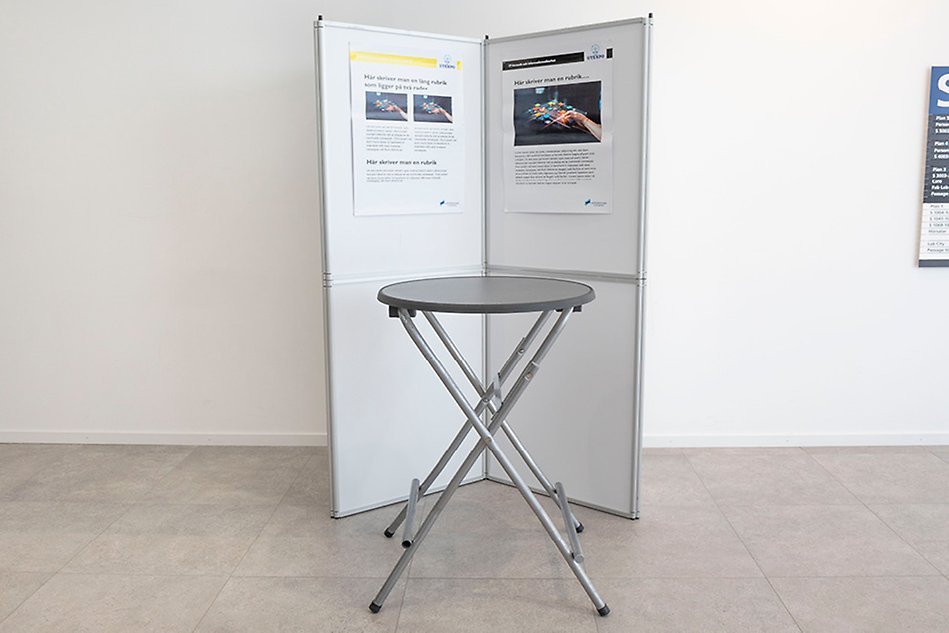
A small stand consists of a round standing table with a diameter of 80 centimeters, two folding walls and two posters. The small stand is approximately 120 centimeters wide.
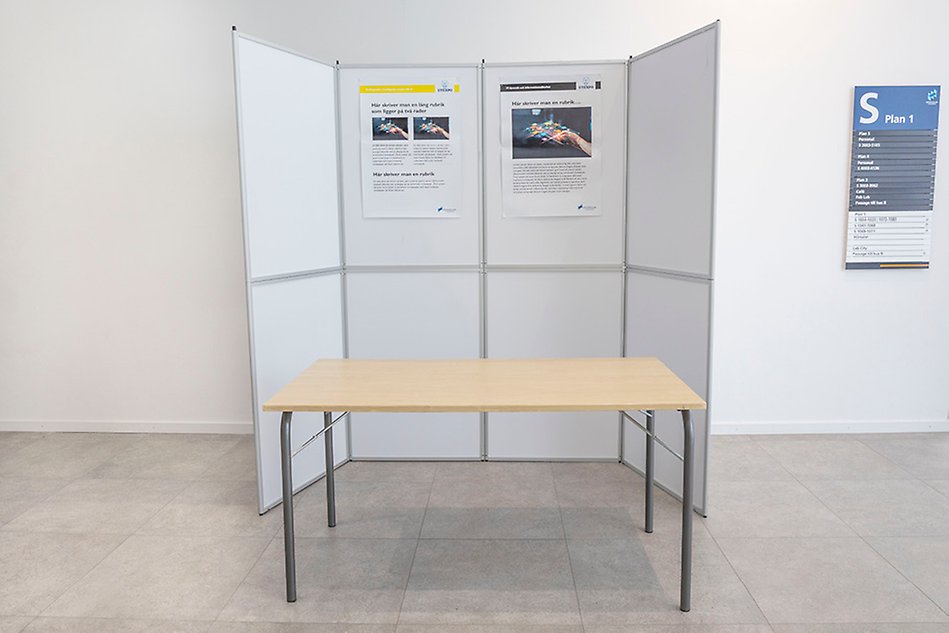
A large stand consists of a low table measuring 70x140 centimeters, four folding walls, and two posters. The large stand is approximately 190 centimeters wide.
Drop-in and stand display
On 3–4 June, from 11.00 to 13.00, the Utexpo Council welcomes all participants to the Service Center at the main entrance to view examples of how a stand can be designed. The Council will also be available to answer questions about Utexpo.
Assembling and disassembling your stand
Tuesday, 2 June, at 15.00
- You have the opportunity to start setting up your stand after 15.00
- Your posters can be collected from the Utexpo Council, who will be available on site.
- Technicians will be available to assist with network connections and related tasks.
Wednesday, 3 June, at 10.30
- Continued opportunity to prepare your stand by 11.30.
Wednesday, 4 June, at 17.00
- Disassembling of stands after 17.00, once the fair has ended.
- Everything used must be cleaned up and tidied away.
Posters
Your posters must be sized 70x100 cm and designed in a layout programme, for example Powerpoint. The University provides a digital poster template that you can use. Choose the correct education programme and colours to both posters. The posters have to be saved in one single PDF document and sent in no later than 20 May.
University computer
Have you registered that you need a University computer in the sign-up form? You will find the inventory number on the computer in the notification. The following applies:
- You take care of moving computers to and from the fair yourself.
- You must be logged into the computer you booked before it is moved, due to network access.
- Students at ITE collect computers from the project rooms.
- Students at FIH collect computers from the halls below:
- Builder CAD S4069
- CAD technician/Catia S3051
- Powerpoint S1075
Network
You get wired network automatically when you have booked a University computer in the sign-up. If you have other equipment, for example lab equipment and/or prototypes that need a wired network, please enter it below Other in the notification. Private computers are referred to the wireless network eduroam.
Electricity
Does your graduation project require electricity supply? State in sign-up form if you need electricity, 230V. Keep in mind that your computer needs to be fully charged before you arrive to the fair.
Liquids
Do you have a graduation project which needs a large amount of liquid? Please contact event@hh.se
Heavy objects
Do you need heavy objects in the University Hall? Please contact event@hh.se
Other
Allergen-causing substances, such as hay and nuts, must not be present in the building.
Presentation skills
The Study Support Centre has a workshop in doing presentations. You can find the events in the student calendar. Additionally, the Study Support Centre has compiled valuable pointers on how to become better at doing presenations.
